
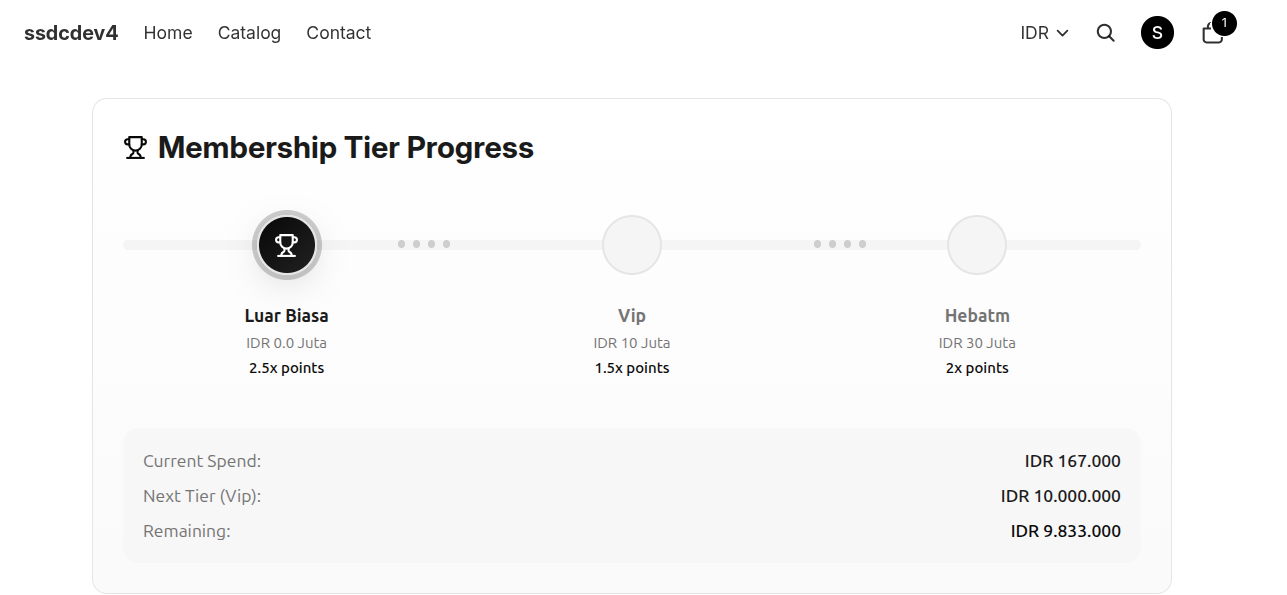
Steps to View Membership Tier Progress
- Log in to your customer account.
- Click the Profile icon in the top-right corner of the store.
- Select Point Rewards.
- Scroll down to the Membership Tier Progress section.
- Review your current tier status and progress toward the next membership level.
Information Displayed
Current Tier
Displays your current membership tier within the loyalty program.
Next Tier
Shows the next membership tier that can be achieved.
Current Spend
Displays the total eligible spending that has been counted toward tier progression.
Remaining
Shows the amount of spending required to reach the next tier.
Point Multiplier
Each tier may provide a different point earning multiplier. Customers in higher tiers may earn points faster on eligible purchases.
Benefits of Higher Tiers
Depending on the merchant's loyalty program configuration, higher membership tiers may provide:
- Higher point multipliers
- Exclusive rewards
- Special promotions
- Additional loyalty benefits
Notes
- Tier requirements and benefits may vary between merchants.
- Progress is updated based on eligible transactions recorded in the loyalty program.
- Customers can continue earning points and advancing through tiers by participating in eligible loyalty activities.