
Customers
View and manage customers enrolled in your loyalty program.
Customers
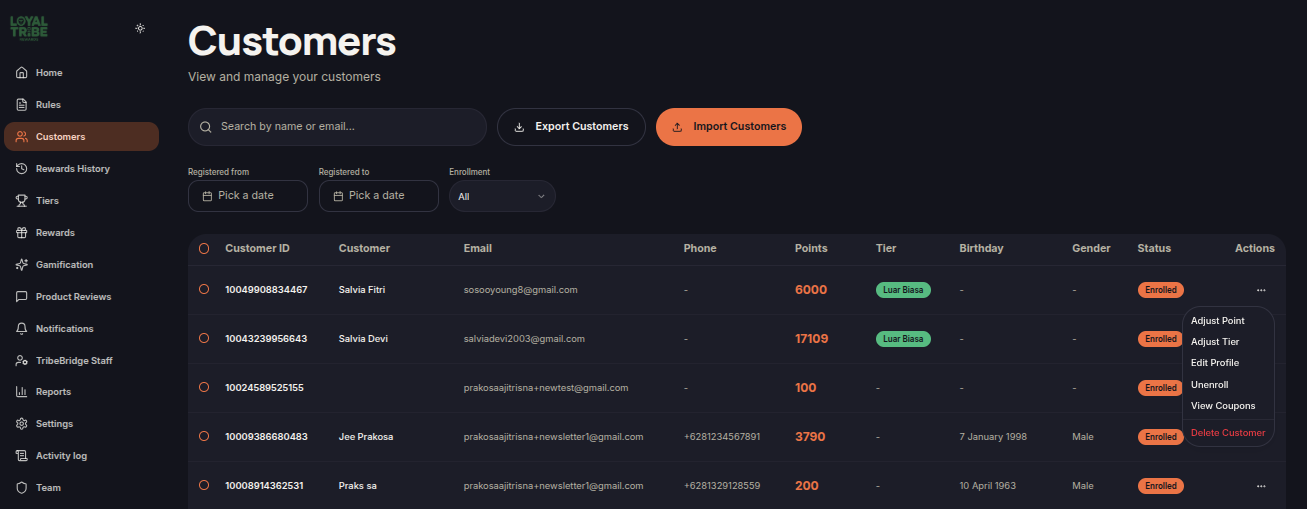
The Customers menu allows merchants to view and manage all customers enrolled in the loyalty program. Merchants can monitor customer information, membership status, point balances, tiers, and perform various account management actions.
View Customers
The Customers page displays all customers enrolled in the loyalty program.
Merchants can search customers by name or email and filter records by registration date and enrollment status.
Manage Customers
Merchants can perform various actions to manage customer accounts directly from the Customers page in the Actions column.
- Adjust Points – Add or deduct customer points.
- Adjust Tier – Manually change a customer's tier.
- Edit Profile – Update customer profile information.
- Enroll / Unenroll – Activate or deactivate a customer's participation in the loyalty program.
- View Coupons – View vouchers assigned to a customer.
- Delete – Remove a customer record from the system.
Import and Export Customers
Merchants can use Import Customers to add customer records in bulk and Export Customers to download customer data for reporting or migration purposes.
Customer Status
Customer status indicates whether a customer is actively participating in the loyalty program.
- Enrolled – The customer is active and can participate in the loyalty program.
- Unenrolled – The customer is inactive and cannot earn or redeem rewards until re-enrolled.