
Product Reviews
Manage, moderate, and respond to customer product reviews.
Product Reviews
The Product Reviews menu allows merchants to manage customer-submitted product reviews. Merchants can review, moderate, reply to customer feedback, and reward customers with loyalty points for review activities.
Main Features
- View all product reviews.
- Moderate customer reviews.
- Reply to reviews.
- Edit review content.
- Delete reviews.
- Configure review settings.
- Sync ratings with Shopify.
Reviews
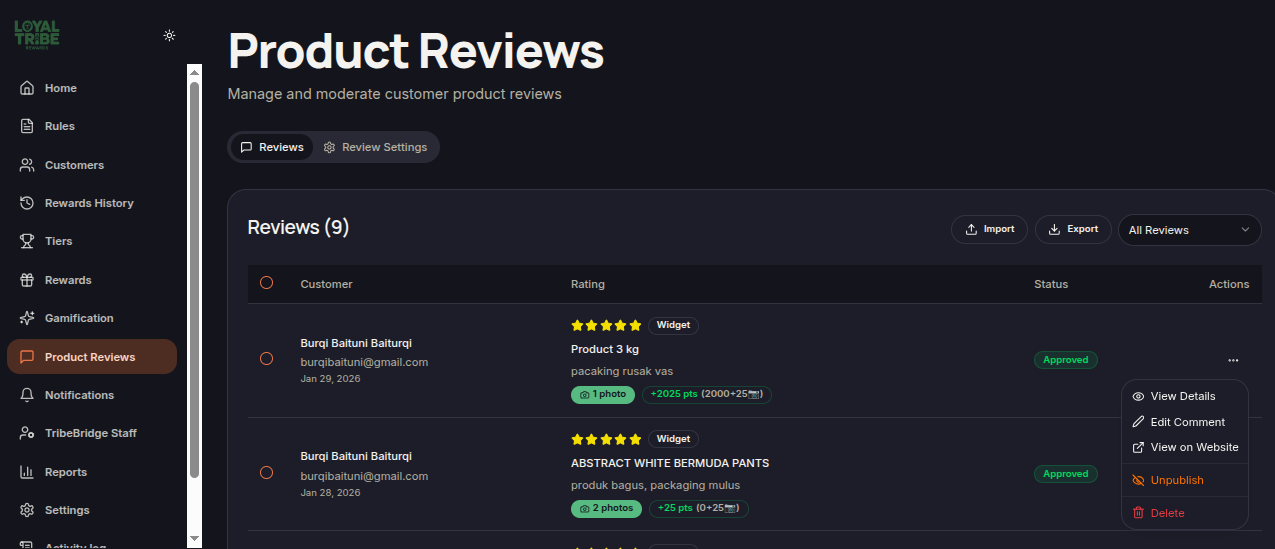
The Reviews tab displays all reviews submitted by customers.
Displayed information includes:
- Customer name.
- Customer email.
- Review date.
- Product name.
- Product rating.
- Customer comment.
- Review images.
- Review status.
- Awarded points.
Points Awarded
Customers may receive loyalty points for submitting reviews.
Points can be awarded through:
- Base Points – Standard points awarded for submitting a review.
- Image Bonus – Additional points awarded when review images are uploaded.
Review Actions
Merchants can perform several actions on reviews:
View Details
Displays complete review information, including:
- Reviewed product.
- Rating.
- Comment.
- Review status.
- Review source.
- Awarded points.
- Approval history.
- Review images.
- Admin replies.
Merchants can reply to customer reviews directly via the View Details page.
Edit Comment
Allows merchants to modify review comments when necessary.
View on Website
Opens the related product page on the store website.
Unpublish
Removes the review from public display without deleting the review record.
Delete
Permanently removes the review from the system.
Review Settings
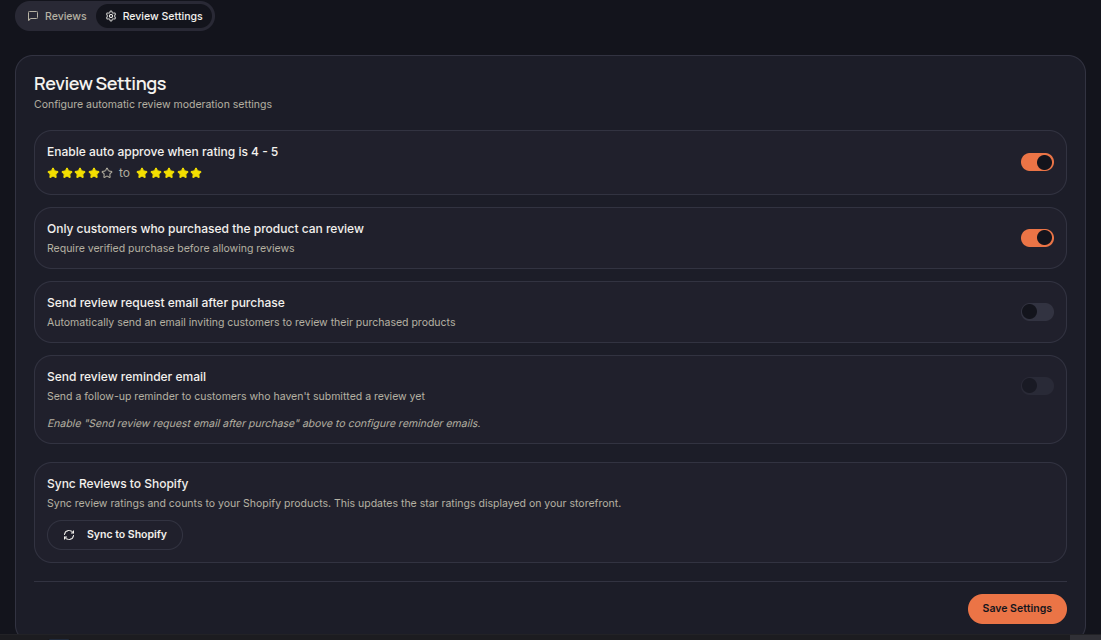
The Review Settings tab controls review moderation and collection settings.
Available settings include:
- Enable auto approve when rating is 4 - 5 — Automatically approve reviews with a star rating of 4–5.
- Only customers who purchased the product can review — Allow reviews only from customers who have purchased the product.
- Send Review Request Email After Purchase — Automatically send review request emails after a purchase.
- Send Review Reminder Email — Send reminder emails to customers who have not yet submitted a review.
- Sync Reviews to Shopify — Sync review ratings and review counts to Shopify so ratings can be displayed on the storefront.
Import and Export
Merchants can import and export review data for reporting and management purposes.
Saving Changes
After modifying review settings, click Save Settings to apply the changes.