
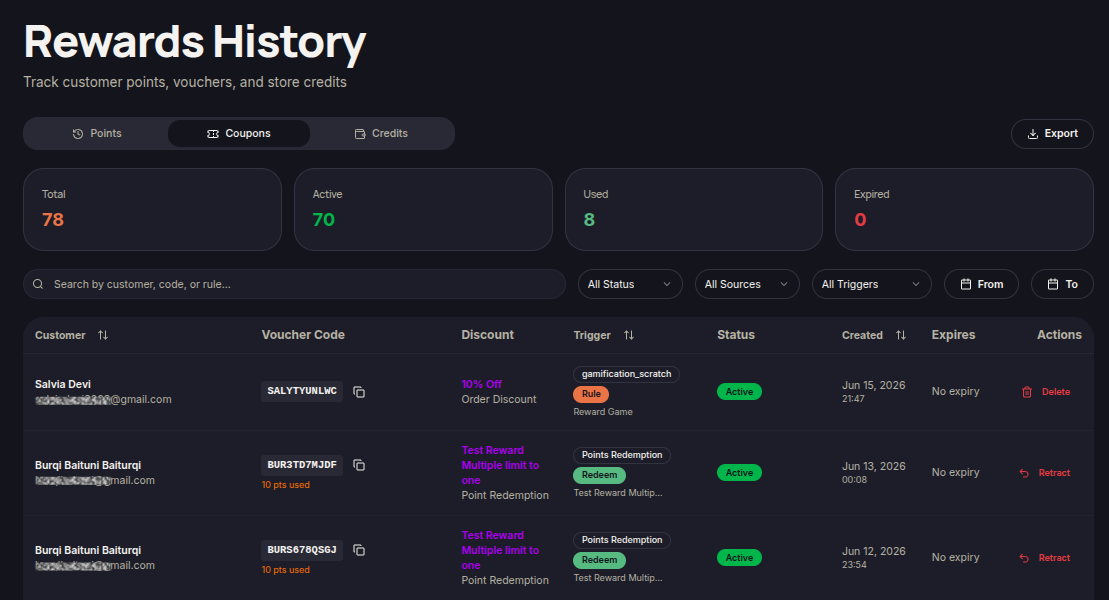
The Coupons tab allows merchants to view all vouchers generated through the loyalty program. Merchants can track active, used, and expired vouchers.
Steps to View Coupon History
- Open the Reward History menu.
- Select the Coupons tab.
- Use the Search field to find vouchers by customer, voucher code, or reward rule.
- Apply filters:
- Status
- Sources
- Triggers
- Use date filters if needed.
- Review the available voucher records.
Statistics Overview
The top section displays:
- Total — Total vouchers issued.
- Active — Currently active vouchers.
- Used — Redeemed vouchers.
- Expired — Expired vouchers.
Information Displayed
- Customer — Customer name and email.
- Voucher Code — Issued voucher code.
- Discount — Discount type and value.
- Trigger — Event that generated the voucher.
- Status — Voucher status.
- Created — Voucher creation date.
- Expires — Voucher expiration date.
- Actions — Available voucher actions.
Available Actions
Retract Voucher
- Locate the voucher you want to revoke.
- Click Retract under Actions.
- Confirm the action when prompted.
The voucher will no longer be available for customer use.
Delete Voucher
- Locate the voucher you want to remove.
- Click Delete under Actions.
- Confirm the deletion.
The voucher will be removed from the coupon history list.