
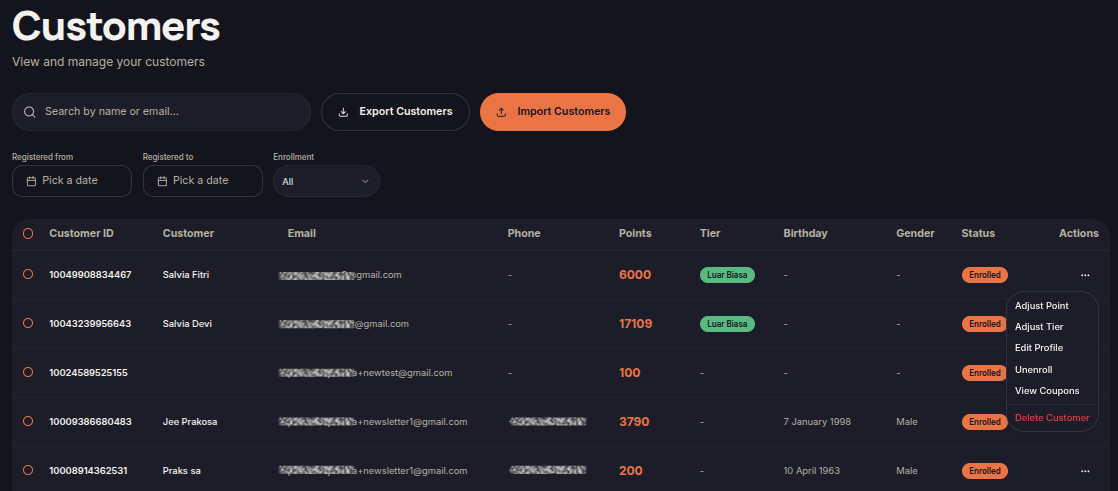
The Customers menu allows merchants to manage all customers enrolled in the loyalty program. Merchants can search, filter, export, import, and manage customer records from a single page.
Steps to View Customers
- Open the Customers menu.
- Use the Search field to find customers by name or email.
- Apply filters:
- Registered From
- Registered To
- Enrollment Status
- Review the customer list.
Information Displayed
- Customer ID — Unique customer identifier.
- Customer — Customer name.
- Email — Customer email address.
- Phone — Customer phone number.
- Points — Current point balance.
- Tier — Customer loyalty tier.
- Birthday — Customer birthday.
- Gender — Customer gender.
- Status — Loyalty membership status.
- Actions — Available customer actions.
Additional Features
Export Customers
Import Customers
- Click Import Customers.
- Upload a supported customer file.
- Review the data before importing.
- Click Import to process the customer records.