
Configure play eligibility
Activate the wheel, configure its prize slots and any no-win slots, then review the daily play limit and cooldown. A zero daily limit means unlimited by that setting; other eligibility checks still apply.
Purchase-based plays
With the on-purchase trigger, the optional minimum-purchase setting requires qualifying order value for plays; other trigger types ignore that threshold. Test with an eligible paid order and inspect the available-play result rather than assuming every login creates a play.
Prizes and stock
Only eligible, available prizes participate in a draw. Gamification rewards can have a maximum-win stock cap; a depleted prize is no longer eligible. Winning and no-win outcomes should both be reflected in the customer's play history. Configure zero-cost gamification rewards separately from recurring membership benefits.
The Spin Wheel feature allows merchants to create a reward wheel that customers can spin to receive loyalty rewards.
Customers receive spins based on configured triggers and can win rewards assigned to wheel slots.
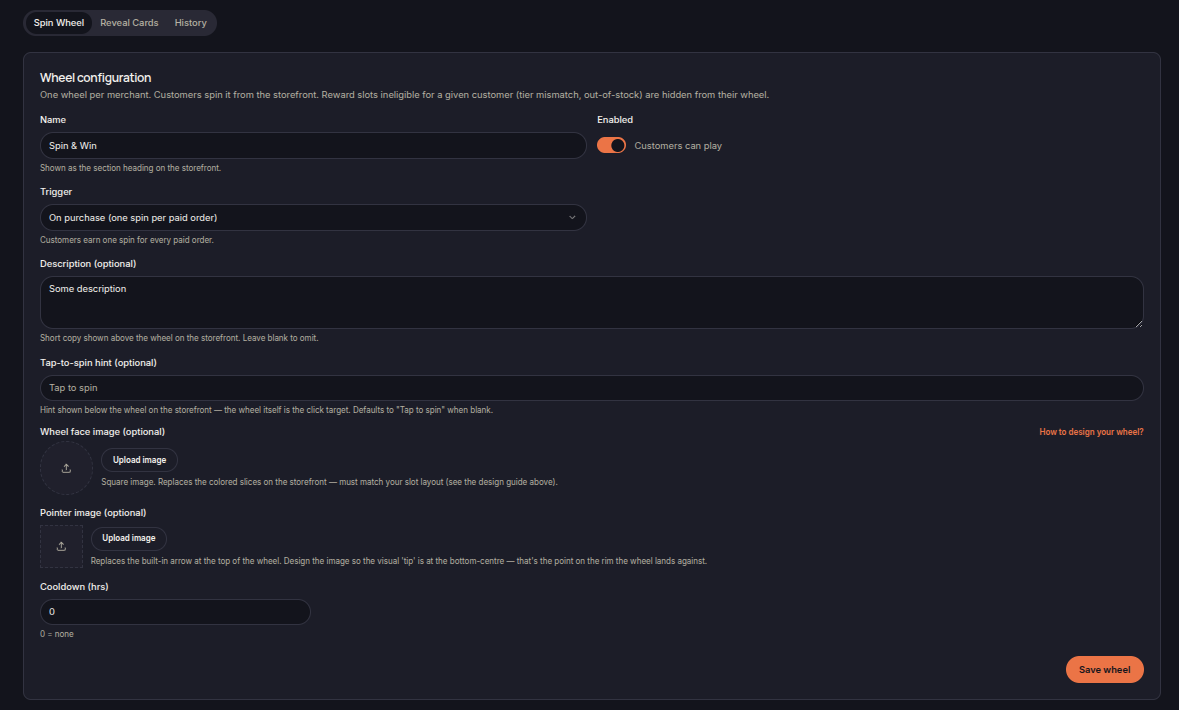
Wheel Configuration
Merchants can configure:
- Wheel name
- Wheel status
- Trigger type
- Description
- Spin hint text
- Cooldown period
The wheel name is displayed as the section heading on the storefront.
Trigger
The Trigger setting determines how customers earn spins.
Example:
- On purchase (one spin per paid order)
When enabled, customers receive a spin each time an eligible order is completed.
Wheel Appearance
Merchants can customize the wheel by uploading:
- Wheel face image
- Pointer image
Custom wheel artwork can be used to match storefront branding.
Cooldown
Cooldown limits how frequently customers can play.
A value of:
- 0 = No cooldown
allows customers to spin whenever they earn a spin.
Save Wheel
Click Save Wheel to apply configuration changes.