
Loyalty Widget
Customize the appearance and content of the loyalty widget displayed on your storefront.
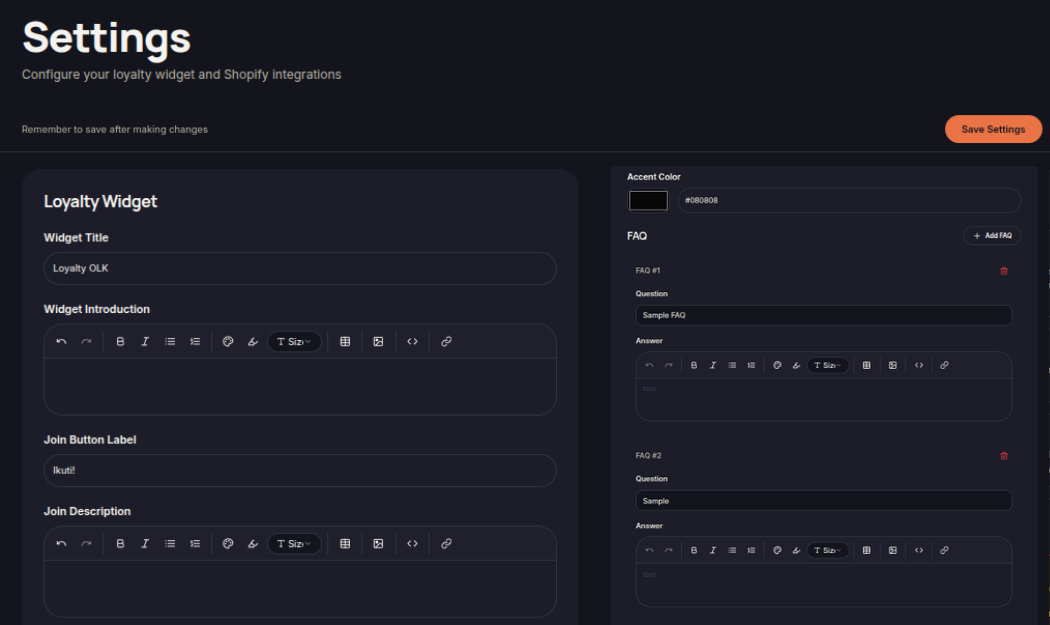
The Loyalty Widget allows merchants to customize how the loyalty program is presented to customers on the storefront.
You can configure the widget's appearance, branding, and messaging to match your store's identity and improve customer engagement.
Widget Content
Merchants can customize various text elements displayed within the loyalty widget, including:
- Widget Title
- Widget Introduction
- Join Button Label
- Join Description
These settings help customers better understand the benefits of joining the loyalty program.
Branding and Appearance
The widget appearance can be customized to align with your store branding.
Available customization options may include:
- Accent Color
- Visual Styling
- Widget Content Layout
Consistent branding helps create a seamless customer experience across your storefront.
Frequently Asked Questions (FAQ)
The Loyalty Widget includes a Frequently Asked Questions (FAQ) section that helps customers understand how the loyalty program works.
Merchants can update FAQ entries to provide information about:
- Earning points
- Redeeming rewards
- Membership benefits
- Program eligibility
Save Changes
After updating the widget settings, click Save Settings to apply the changes to your storefront.