
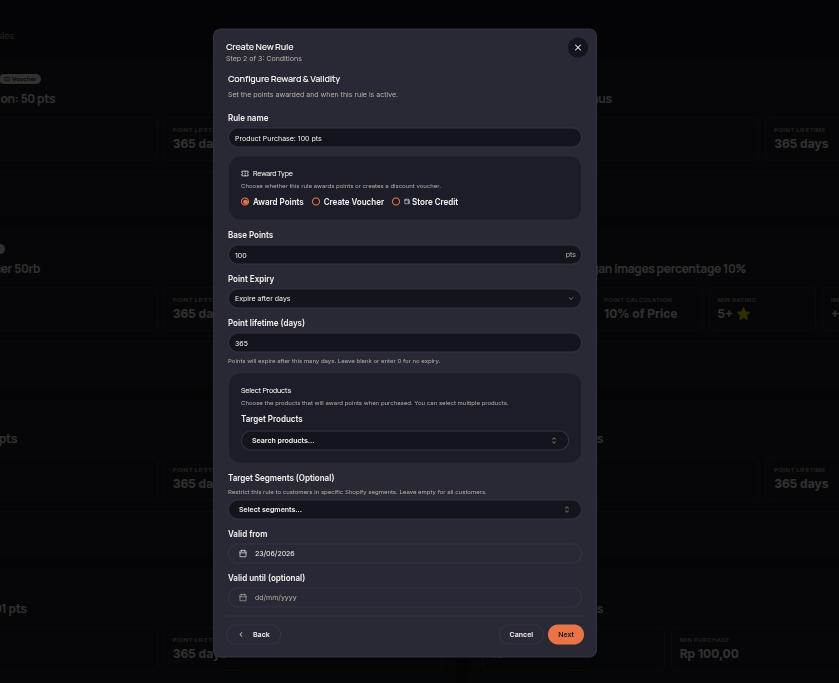
Configure product eligibility
In a Product Purchase rule, select the qualifying products, purchase requirement, reward, dates, and any tier or segment restrictions. A product list supports up to 250 distinct products.
How often to award
- Once per order: one award when the order contains a qualifying product.
- Per product: points for each distinct qualifying product in the order. Quantity is not a multiplier. This mode requires a product list and a points reward.
- Once per campaign: one successful grant per customer for the rule, with a required start and end date.
Product-list and once-per-campaign options support points or voucher codes, not shared automatic discounts or store credit. Existing rules without these options retain their previous behavior. Test multiple matching products and multiple quantities before launching.
The Product Purchase rule rewards customers when they purchase selected products. Merchants can use this rule to promote specific products or support targeted marketing campaigns.
Steps to Create a Product Purchase Rule
- Open the Rules menu.
- Click Create Rule.
- Select Product Purchase.
- Choose the qualifying product(s).
- Select the reward type (Points or Voucher).
- Set the reward amount customers will receive.
- (Optional) Configure eligible customer tiers or segments.
- Set the rule validity period if needed.
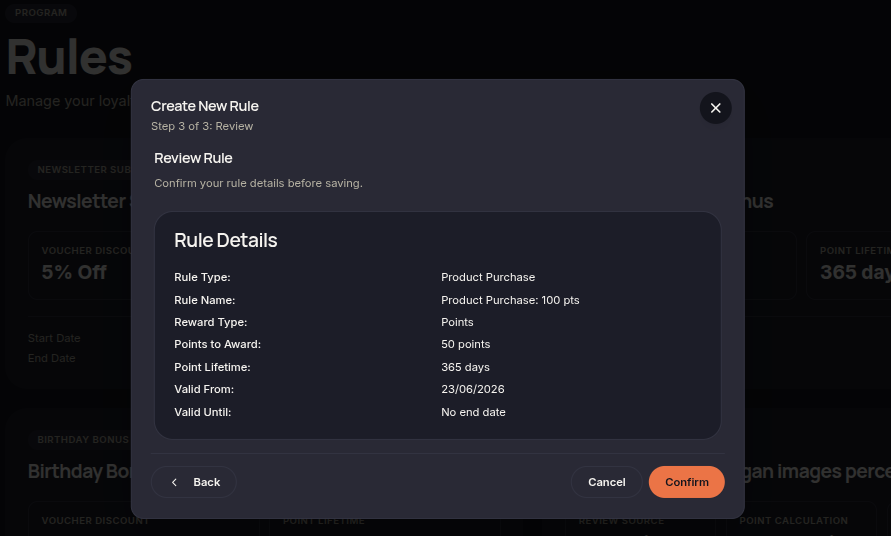
- Click Next to review the configuration.
- Click Confirm rule to save and activate the rule.
Additional Information
- Rewards are only granted when qualifying products are purchased.
- Multiple product purchase rules can be created for different campaigns.
- Rewards are automatically issued once the qualifying order is completed.