
Reward Expiration Emails
Configure reminder emails that notify customers before their rewards expire.
Reward Expiration Emails help merchants notify customers when a redeemed reward is approaching its expiration date.
These automated notifications encourage customers to use their rewards before they become unavailable.
Expiration Warning Email
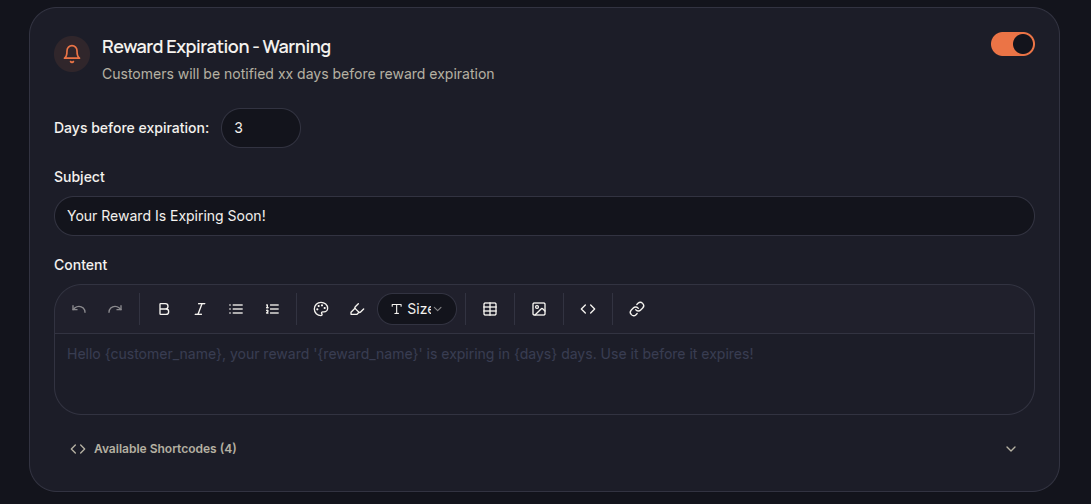
The Reward Expiration – Warning email is sent a specified number of days before a reward expires.
Merchants can configure:
- Days Before Expiration
- Subject
- Email Content
- Available Shortcodes
This reminder gives customers advance notice to redeem or use their reward before it expires.
Last Chance Email
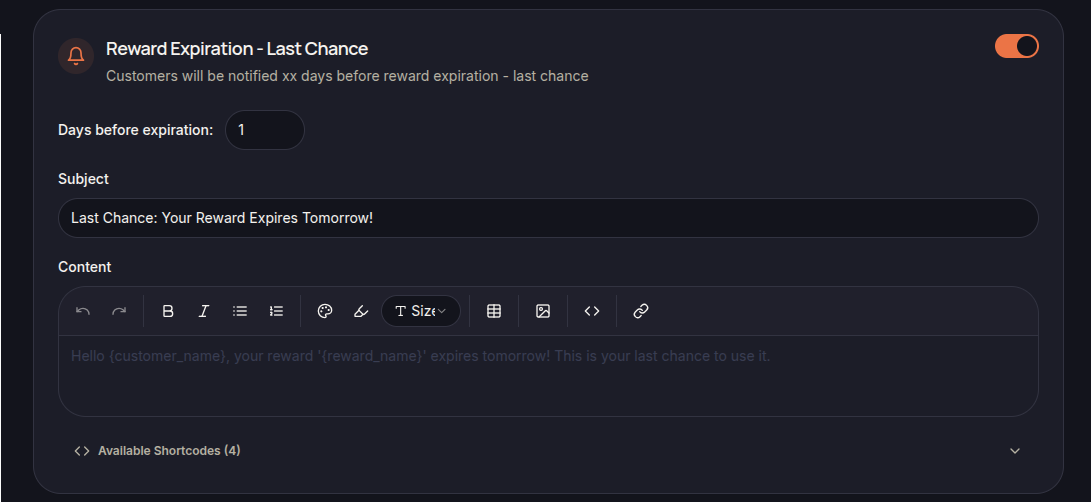
The Reward Expiration – Last Chance email is sent shortly before a reward expires.
Merchants can configure:
- Days Before Expiration
- Subject
- Email Content
- Available Shortcodes
This notification serves as a final reminder before the reward is no longer valid.
Using Shortcodes
Shortcodes can be used to automatically insert customer and reward information into the email.
Examples include:
- {cutomer_name}
- {reward_name}
- {days}
Available shortcodes are displayed in the email editor.
Best Practices
To improve reward utilization:
- Send warning emails several days before expiration.
- Clearly state which reward is expiring.
- Remind customers of the reward benefits.
- Encourage customers to use the reward before the expiration date.
Save Changes
Click Save Settings to apply the updated email templates.