
Spin Wheel
Configure the spin wheel experience, including triggers, appearance, rewards, and customer participation settings.
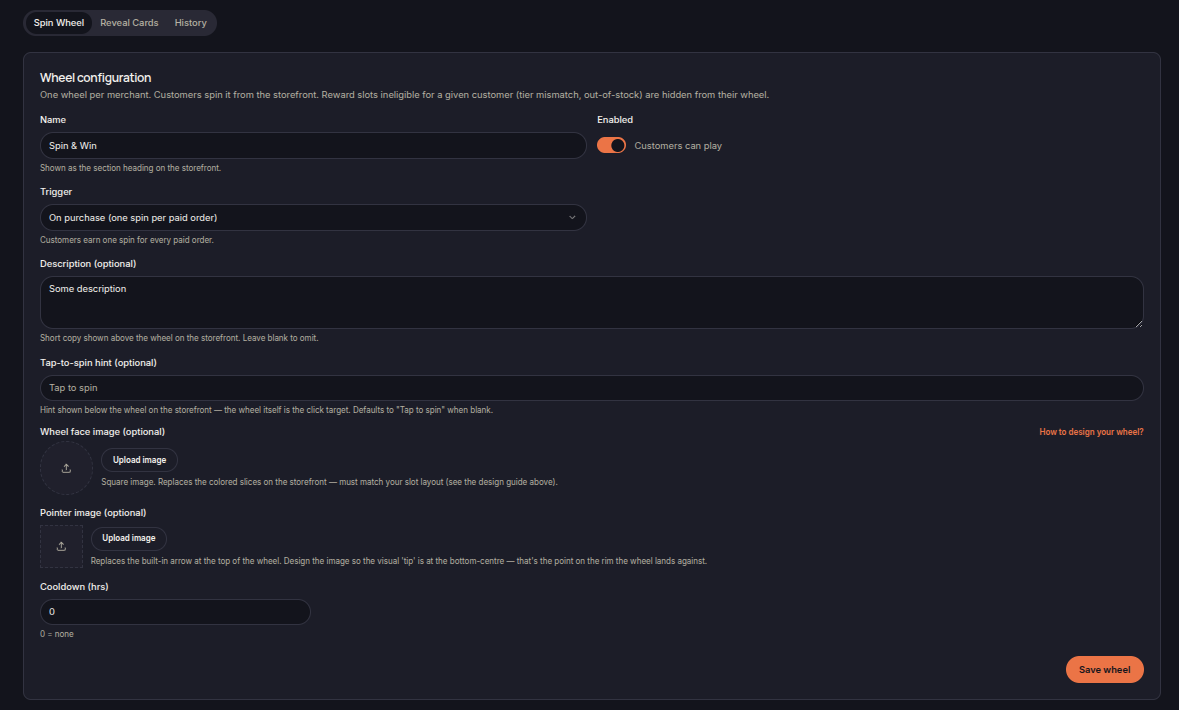
The Spin Wheel feature allows merchants to create a reward wheel that customers can spin to receive loyalty rewards.
Customers receive spins based on configured triggers and can win rewards assigned to wheel slots.
Wheel Configuration
Merchants can configure:
- Wheel name
- Wheel status
- Trigger type
- Description
- Spin hint text
- Cooldown period
The wheel name is displayed as the section heading on the storefront.
Trigger
The Trigger setting determines how customers earn spins.
Example:
- On purchase (one spin per paid order)
When enabled, customers receive a spin each time an eligible order is completed.
Wheel Appearance
Merchants can customize the wheel by uploading:
- Wheel face image
- Pointer image
Custom wheel artwork can be used to match storefront branding.
Cooldown
Cooldown limits how frequently customers can play.
A value of:
- 0 = No cooldown
allows customers to spin whenever they earn a spin.
Save Wheel
Click Save Wheel to apply configuration changes.