
Create a New Tier
Create a new loyalty tier to group customers based on loyalty level and assigned benefits.
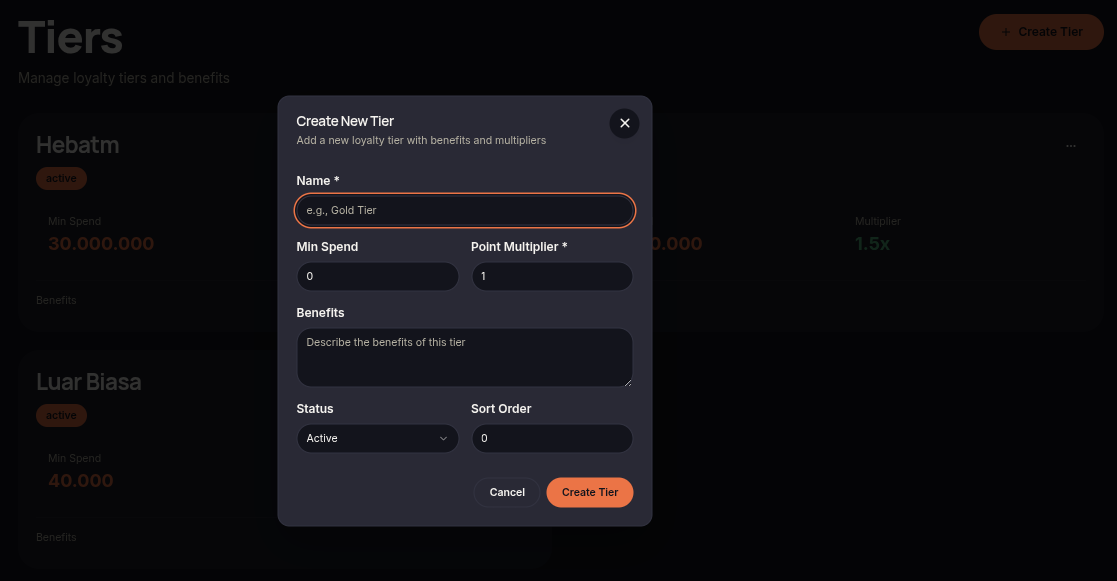
The Create Tier feature allows merchants to add a new loyalty tier with its own spending requirements, benefits, and point multiplier settings.
Steps
- Open the Tiers menu.
- Click Create Tier.
- Enter the Name of the tier.
- Set the Min Spend requirement.
- Configure the Point Multiplier.
- Add information in the Benefits field if needed.
- Select the desired Status.
- Set the Sort Order.
- Click Create Tier to save the tier.
Notes
- Higher Point Multiplier values allow customers to earn more points.
- Sort Order determines how tiers are displayed in the system.
- Tiers with Inactive status will not be used in the loyalty program.