
Reward History Coupons
Monitor loyalty-generated vouchers, including their status, source, expiration date, and redemption activity.
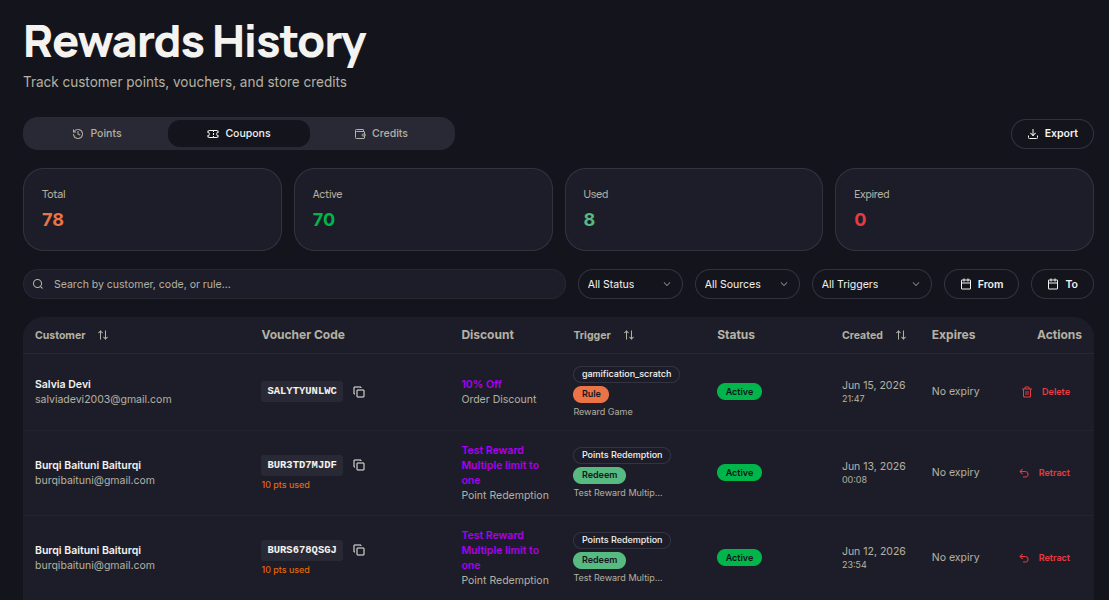
The Coupons tab allows merchants to view all vouchers generated through the loyalty program. Merchants can track active, used, and expired vouchers.
Steps to View Coupon History
- Open the Reward History menu.
- Select the Coupons tab.
- Use the Search field to find vouchers by customer, voucher code, or reward rule.
- Apply filters:
- Status
- Sources
- Triggers
- Use date filters if needed.
- Review the available voucher records.
Statistics Overview
The top section displays:
- Total — Total vouchers issued.
- Active — Currently active vouchers.
- Used — Redeemed vouchers.
- Expired — Expired vouchers.
Information Displayed
- Customer — Customer name and email.
- Voucher Code — Issued voucher code.
- Discount — Discount type and value.
- Trigger — Event that generated the voucher.
- Status — Voucher status.
- Created — Voucher creation date.
- Expires — Voucher expiration date.
- Actions — Available voucher actions.
Available Actions
Retract Voucher
- Locate the voucher you want to revoke.
- Click Retract under Actions.
- Confirm the action when prompted.
The voucher will no longer be available for customer use.
Delete Voucher
- Locate the voucher you want to remove.
- Click Delete under Actions.
- Confirm the deletion.
The voucher will be removed from the coupon history list.