
Reward History Points
View customer point activity, including earned, redeemed, and awarded points across your loyalty program.
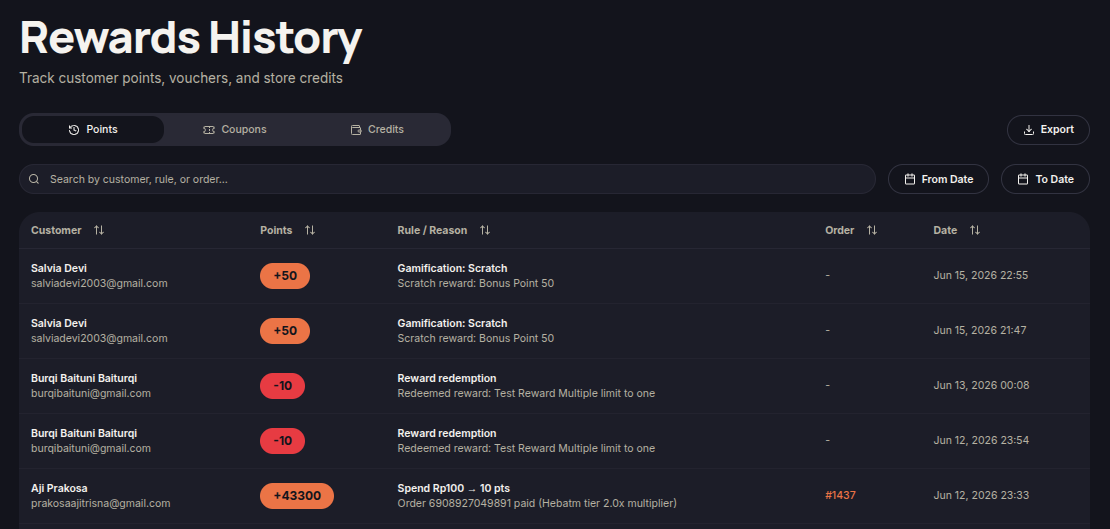
The Points tab allows merchants to monitor all customer point activities within the loyalty program. This includes points earned, redeemed, and awarded through various loyalty interactions.
Steps to View Point History
- Open the Reward History menu.
- Select the Points tab.
- Use the Search field to find records by customer, rule, or order.
- Use the From Date and To Date filters to select a reporting period.
- Review the available point activity records.
Information Displayed
- Customer — Customer name and email address.
- Points — Points added to or deducted from the customer's balance.
- Rule / Reason — Reason for the point activity.
- Order — Related order number, if applicable.
- Date — Date and time of the activity.
Additional Information
- Positive values indicate points earned.
- Negative values indicate points redeemed or deducted.
- Point history includes purchases, reward redemptions, and gamification activities.