
Customers List
View and manage loyalty program customers, including profile information, points, tiers, and membership status.
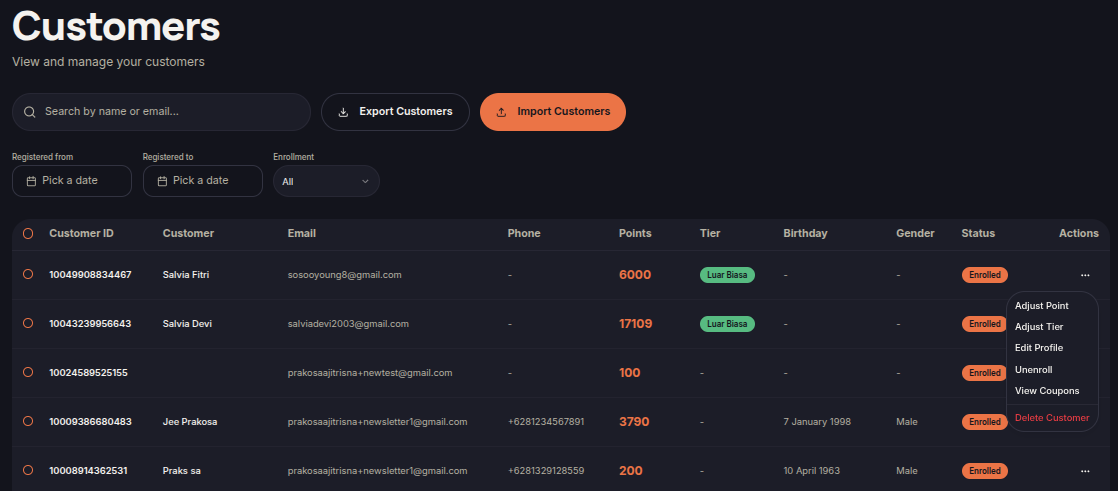
The Customers menu allows merchants to manage all customers enrolled in the loyalty program. Merchants can search, filter, export, import, and manage customer records from a single page.
Steps to View Customers
- Open the Customers menu.
- Use the Search field to find customers by name or email.
- Apply filters:
- Registered From
- Registered To
- Enrollment Status
- Review the customer list.
Information Displayed
- Customer ID — Unique customer identifier.
- Customer — Customer name.
- Email — Customer email address.
- Phone — Customer phone number.
- Points — Current point balance.
- Tier — Customer loyalty tier.
- Birthday — Customer birthday.
- Gender — Customer gender.
- Status — Loyalty membership status.
- Actions — Available customer actions.
Additional Features
Export Customers
Import Customers
- Click Import Customers.
- Upload a supported customer file.
- Review the data before importing.
- Click Import to process the customer records.