
Newsletter Subscription
Reward customers with points or vouchers after subscribing to your store newsletter.
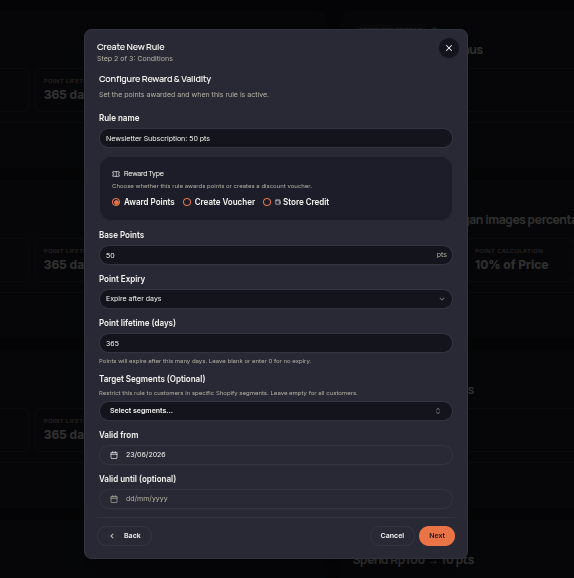
The Newsletter Subscription rule automatically rewards customers after they successfully subscribe to the store newsletter. Rewards may be issued as points or vouchers to encourage customers to receive promotions, announcements, and store updates.
Steps to Create a Newsletter Subscription Rule
- Open the Rules menu.
- Click Create Rule.
- Select Newsletter Subscription.
- Choose the reward type (Points or Voucher).
- Set the reward amount customers will receive after subscribing.
- (Optional) Select customer segments eligible for the reward.
- Configure the rule validity period if needed.
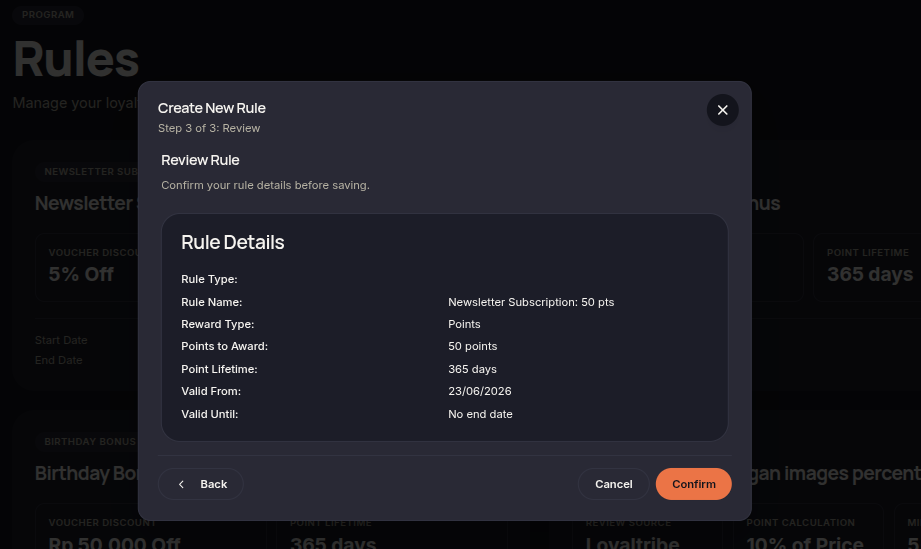
- Click Next to review the configuration.
- Click Confirm rule to save and activate the rule.
Additional Information
- Rewards are only issued after a successful newsletter subscription.
- The rule can be restricted to specific customer segments.
- Rewards are automatically granted once the conditions are met.