
Overview
View loyalty program performance, customer growth, recent activity, and quick access to key features from a single dashboard.
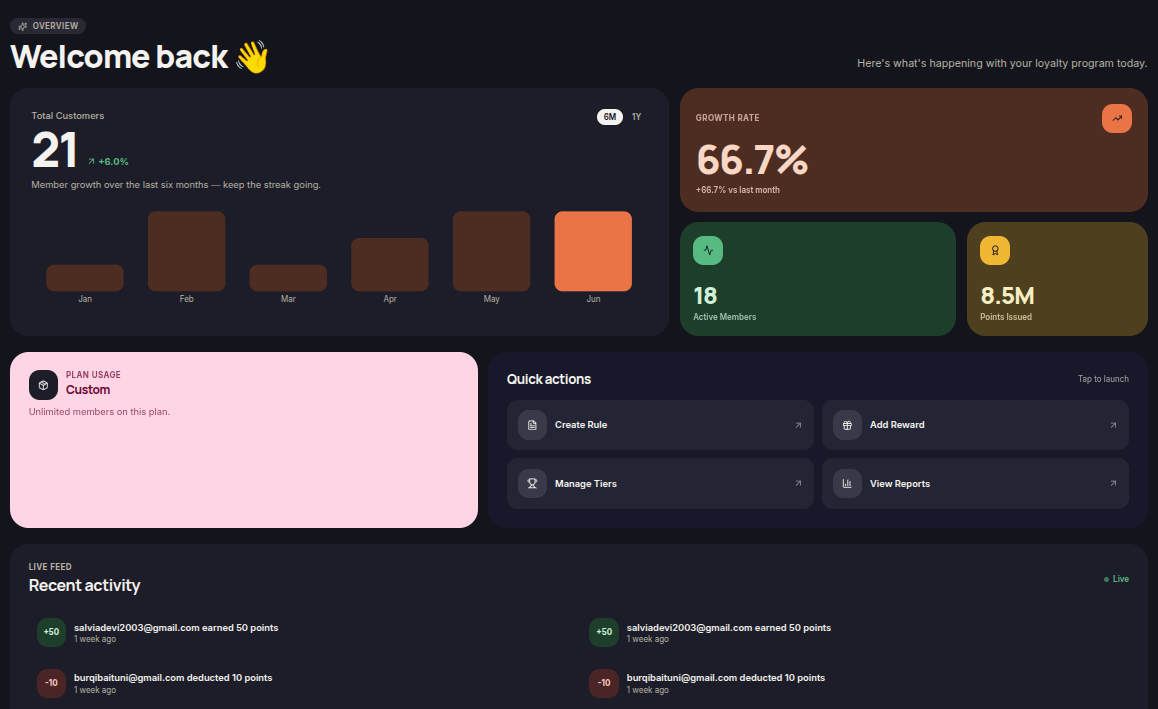
The Home page serves as the main Merchant Dashboard, providing a real-time overview of your loyalty program. Merchants can monitor customer growth, recent activity, loyalty statistics, and access frequently used features through Quick Actions.
Information Displayed
Total Customers
Displays the total number of customers enrolled in the loyalty program.
The chart helps merchants track customer growth over selected periods, such as:
- 6 Months (6M)
- 1 Year (1Y)
Growth Rate
Displays the customer growth percentage compared to the previous period.
This metric helps merchants understand overall loyalty program growth.
Active Members
Displays the number of customers actively engaging with the loyalty program.
Points Issued
Displays the total number of loyalty points issued to customers.
Plan Usage
Displays information about the merchant's current subscription plan and usage limits.
Recent Activity
Displays the latest loyalty-related customer activities, including:
- Points earned
- Points deducted
- Reward redemptions
- Other loyalty program activities
Quick Actions
The Quick Actions section provides shortcuts to frequently used features.
Create Rule
Opens the rule creation page.
This action is equivalent to Rules → Create Rule.
Add Reward
Opens the reward creation page.
This action is equivalent to Rewards → Create Reward.
Manage Tiers
Redirects merchants to the Tiers page to manage customer loyalty tiers.
View Reports
Redirects merchants to the Reward History page to view points, voucher, and store credit activity.
Additional Information
- Dashboard data updates automatically based on customer activity.
- Quick Actions provide faster access to commonly used features.
- Displayed statistics may vary depending on selected periods and loyalty program activity.