
Anniversary Bonus
Automatically reward customers on their loyalty membership anniversary.
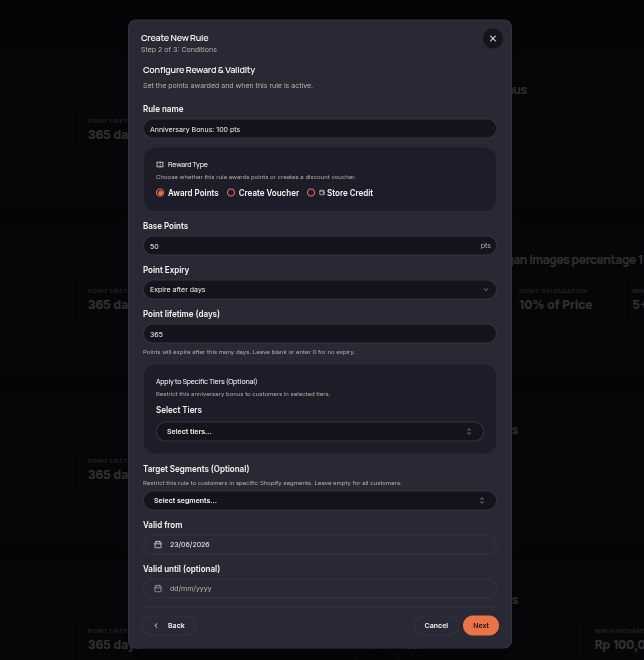
The Anniversary Bonus rule allows merchants to reward customers with points or vouchers each year on the anniversary of their loyalty program enrollment. This helps strengthen long-term customer engagement and loyalty.
Steps to Create an Anniversary Bonus Rule
- Open the Rules menu.
- Click Create Rule.
- Select Anniversary Bonus.
- Choose the reward type (Points or Voucher).
- Set the reward amount customers will receive on their membership anniversary.
- (Optional) Select eligible customer tiers or segments.
- Configure the rule validity period.
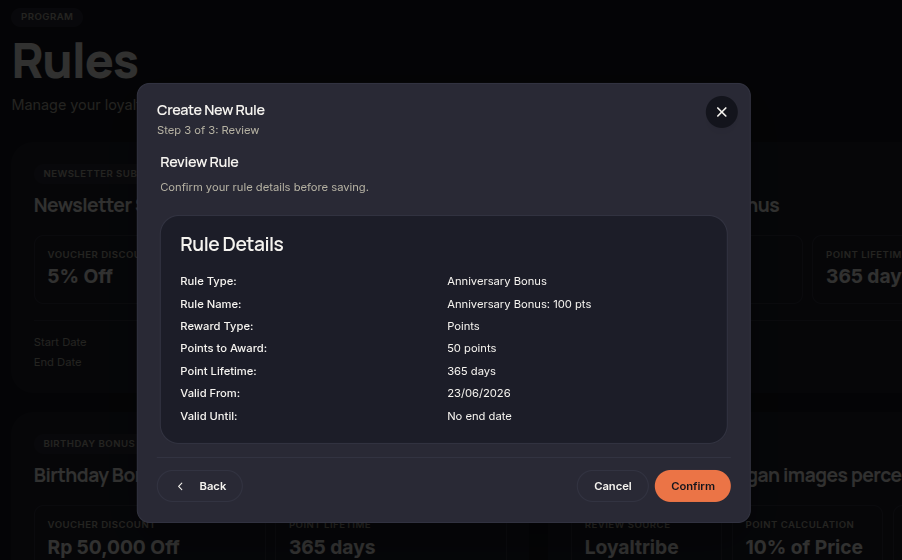
- Click Next to review the configuration.
- Click Confirm rule to save and activate the rule.
Additional Information
- Rewards are issued annually based on the customer's enrollment date.
- Merchants may restrict rewards to specific tiers or customer segments.
- Rewards are automatically granted when the anniversary date is reached.