
Complete Profile
Reward customers with points or vouchers after completing their profile information.
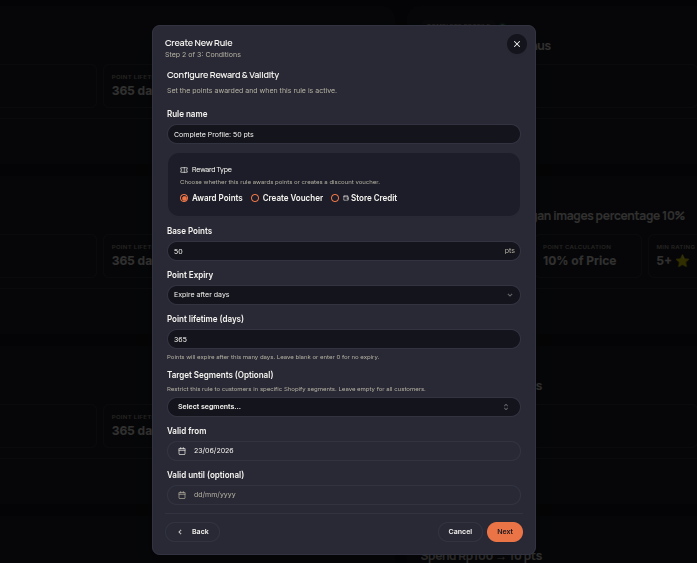
The Complete Profile rule rewards customers after they complete the required profile information. This rule helps merchants encourage customers to provide more complete and accurate profile data.
Steps to Create a Complete Profile Rule
- Open the Rules menu.
- Click Create Rule.
- Select Complete Profile.
- Choose the reward type (Points or Voucher).
- Set the reward amount customers will receive after completing their profile.
- (Optional) Select customer segments eligible for the reward.
- Configure the rule validity period if needed.
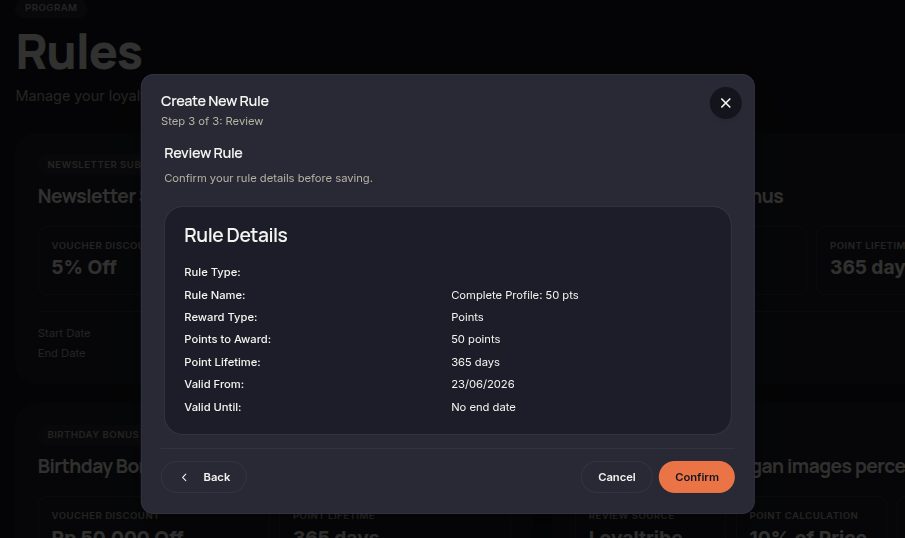
- Click Next to review the configuration.
- Click Confirm rule to save and activate the rule.
Additional Information
- Rewards are only issued after the required profile information has been completed.
- This rule is commonly used to improve customer profile completeness.
- Rewards are automatically granted once the conditions are met.