
Referral Bonus
Reward customers who successfully refer new customers to your store.
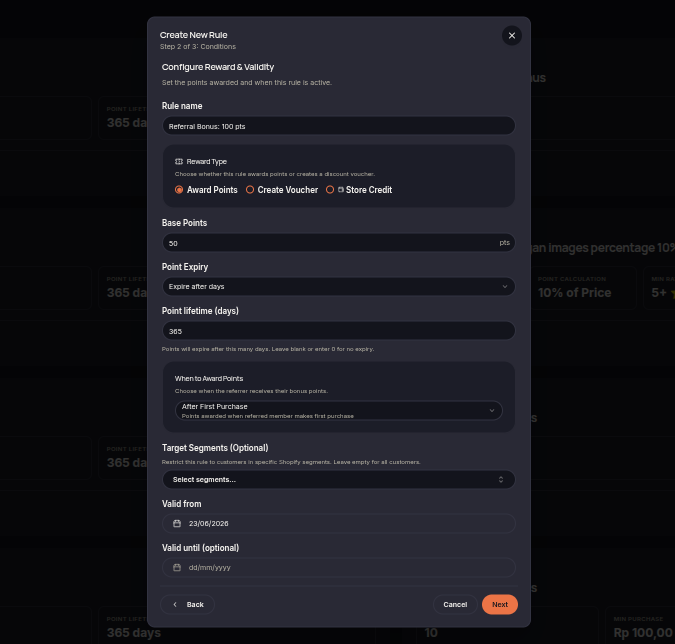
The Referral Bonus rule rewards customers who successfully refer new customers. Rewards may be issued after the referred customer signs up or completes their first purchase, depending on the configured referral requirements.
Referral programs help merchants acquire new customers through recommendations from existing customers.
Steps to Create a Referral Bonus Rule
- Open the Rules menu.
- Click Create Rule.
- Select Referral Bonus.
- Choose the reward type (Points or Voucher).
- Set the reward amount for successful referrals.
- Configure the referral requirements.
- (Optional) Select eligible customer tiers or segments.
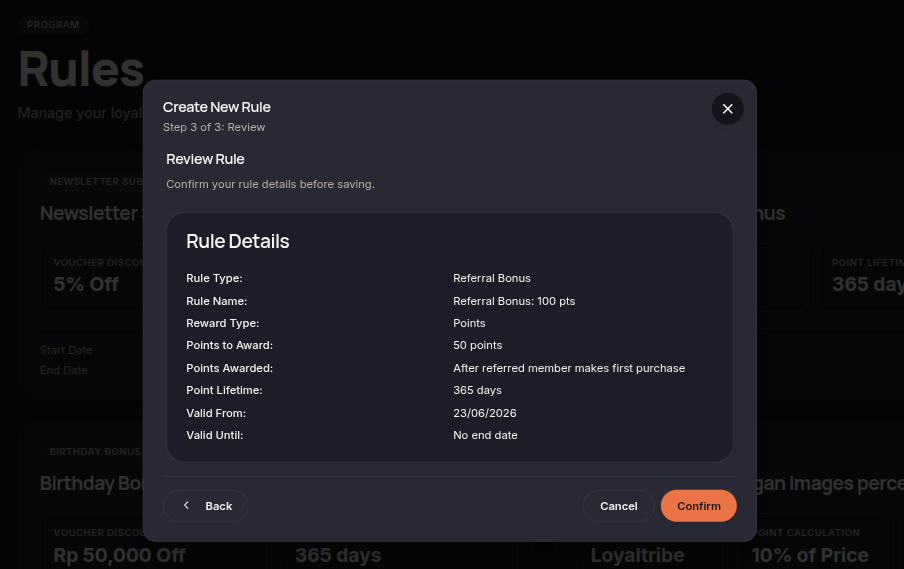
- Click Next to review the configuration.
- Click Confirm rule to save and activate the rule.
Additional Information
- Rewards are granted once the referral requirements are met.
- This rule can help increase customer acquisition.
- Rewards are automatically issued according to the referral program settings.